Identity & Access Management (IAM)
To enforce strict operational boundaries, maintain multi-tenant compliance, and prevent unauthorized permission accumulation (privilege creep), Awetonet.io utilizes a separated security architecture.
The system hierarchy flows from the root Superuser into a structured Permissions framework that divides authority into two distinct operational scopes: Organization-Level Permissions and Site-Level Permissions.
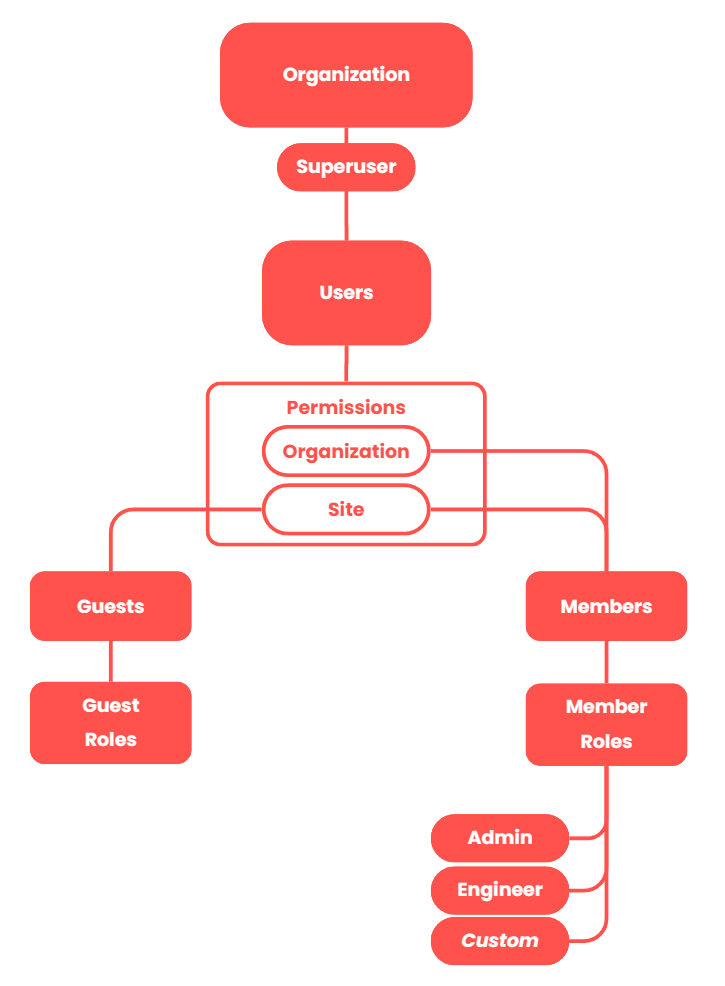
1. The Core Permission Division
Permissions are not applied globally as a single, combined configuration. Instead, they are evaluated at two completely independent levels to maximize security control and data isolation.
🏢 Organization-Level Permissions
Organization permissions govern the administrative and financial configuration of the entire tenant environment. They control which user accounts can modify the organization settings itself, rather than interacting with active infrastructure assets.
- Definition: Permission scopes that control high-level environment changes across the entire tenant boundary.
- Examples:
- Identity Provisioning: Inviting, adding, or removing Member/Guest.
- Asset Creation: Generating a brand new Site container within the Organization.
- Financial Governance: Purchasing, assigning, or renewing software and hardware Licenses.
📍 Site-Level Permissions
Site permissions govern the granular collaborative environment within the individual functional units. They determine exactly what an authenticated user can view and execute when they access a specific Site environment.
- Definition: Scopes that dictate functional feature visibility and action executions inside a specific Site environment.
- Examples:
- Page Visibility: Determining whether a user can access advanced configuration tabs, real-time analytics dashboards, or telemetry logs.
- UI Element & Button Hiding: Showing or hiding critical administrative controls (for example, hiding a "Delete Site" or "Save Changes" button based on the assigned role level).
- Operational Actions: Restricting high-risk interactions like executing a remote hardware reboot or launching a live web terminal session.
2. User Categories & Roles
The system separates users into two distinct categories, each assigned specific combinations of Organization and Site permissions.
👥 Members (Internal Personnel)
Members represent your internal corporate workforce, engineering departments, and core operations teams who require ongoing access across the network map.
- Hierarchical Levels: Specific permissions are dictated by specific Member Roles: Admin, Engineer, or customizable Custom options.
- Privilege Escalation Protection: To maintain organizational control, a Member cannot view, create, or modify a security role higher than their own assigned level.
✉️ Guests (External Stakeholders)
Guests are reserved for third-party contractors, vendors, or local site owners who require isolated, time-bound access.
- Per-Site Isolation: Guests possess no Organization-level permissions (for example, they cannot add members or create sites).
- Restricted Site Scope: Their access is restricted strictly to a per-site basis, governed by designated Guest Roles.
- The Interface Simplification Feature: To hide technical complexity from non-technical external clients, administrators can enable a "Recents" view. This hides technical pages and completely disables critical action buttons (such as web terminal access and remote hardware reboots) through user interface access controls.
Capability Matrix
| Functional Capability | 👥 Member (Internal) | ✉️ Guest (External) |
|---|---|---|
| Scope of Authority | Global Organization / Multiple Sites | Restricted to Per-Site Basis Only |
| Management Zone Access | Yes (Designed for large-scale management) | No (Explicitly Restricted) |
| User Interface Display | Complete Technical Workspace Interface | Optional "Recents" Page |
| Security Configuration | Governed by Role Hierarchies | Optional disabling of Disruptive Actions |